The client call ends. The recap is already in Slack.
Patricia joins the client call, records it, and posts the TLDR minutes later: the decisions saved to memory, the action items on the task list with owners, and a first stab offered on the work she can do herself. You decide which meetings she joins and who sees each recording.
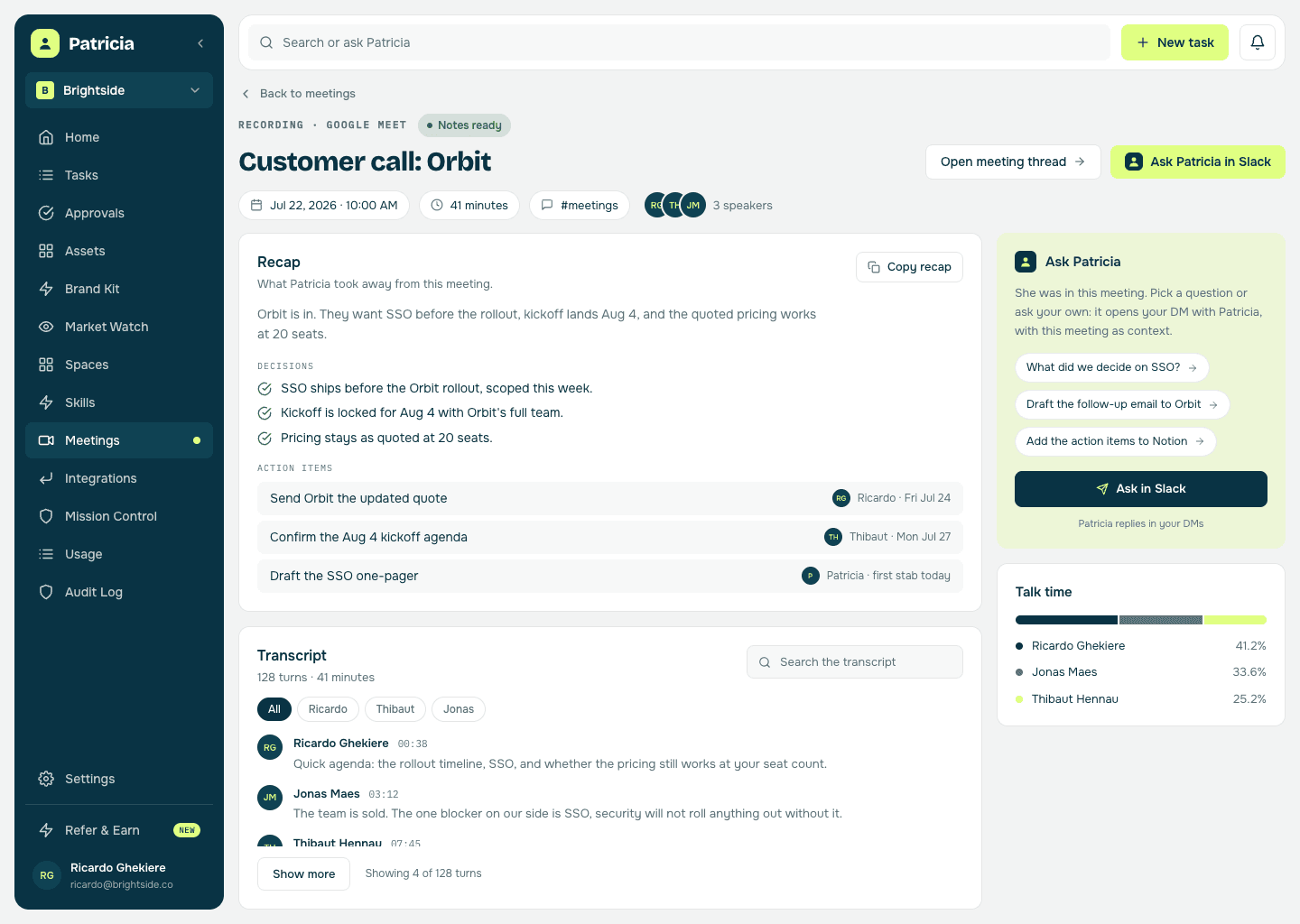
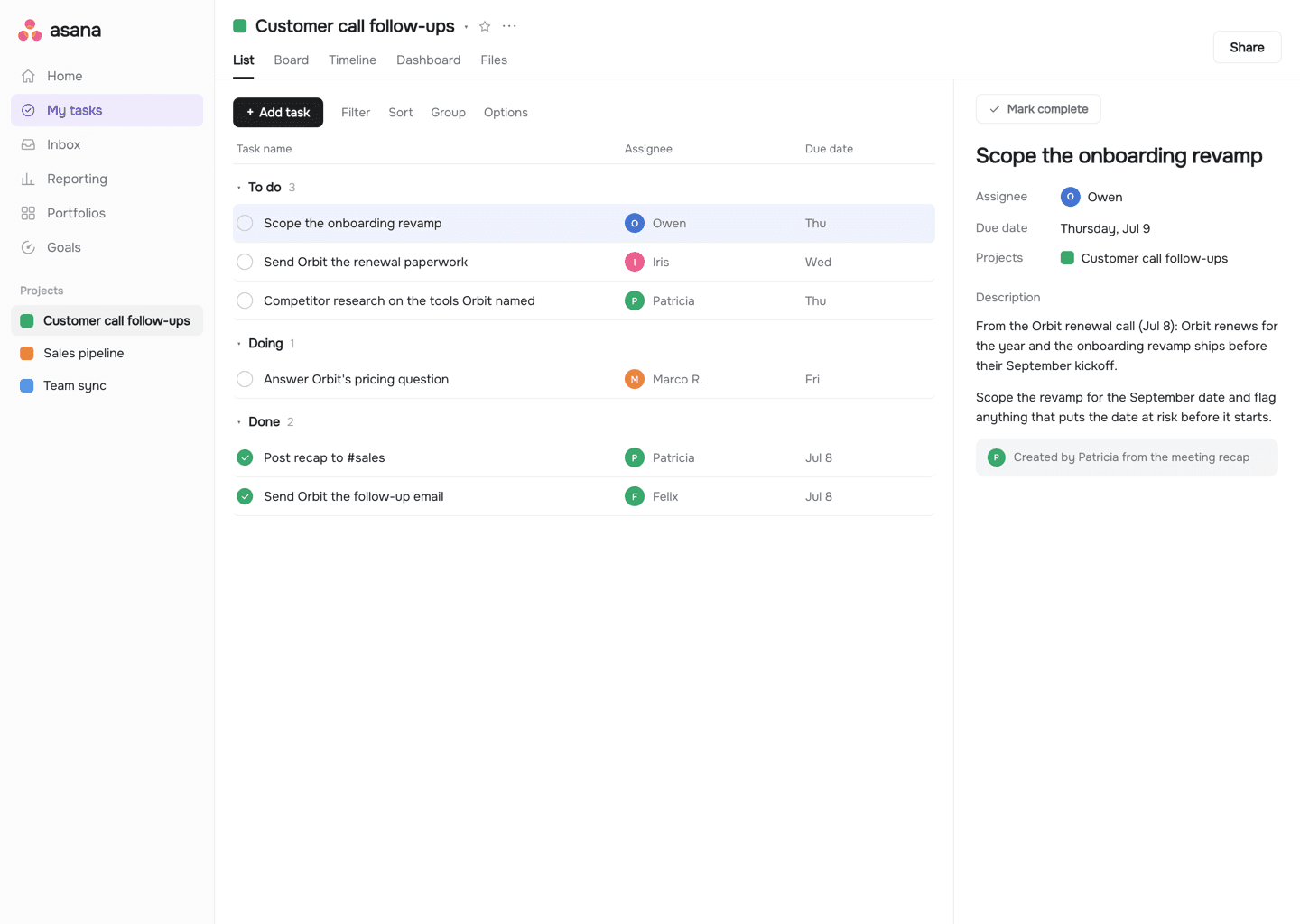
An illustration plays the notetaker loop: Patricia records a client call, posts the recap with a TLDR in the internal client channel, saves the decisions to that account's memory, puts the action items in Notion with owners, and offers the account manager a first draft of a task she can do herself.
 3 action items pushed to Notion
The old way
How agencies do this today.
Every call at your agency ends with good intentions: the client check-in, the pitch, the internal sync. Turning them into work that actually happens is where it falls apart.
The note-taker who missed half of it
An account manager half-listens so they can type, still misses something the client agreed to, and spends the evening turning shorthand into something the rest of the team can read.
The transcription bot's wall of text
A meeting bot drops a full transcript and a generic summary in a folder nobody opens. No decisions pulled out, no next steps, and it charges per seat to do only that.
The next steps that evaporate
Three things were agreed with the client. None became a task, nobody owned them, and next week everyone reconstructs what was supposed to happen.
Inside Patricia
What it looks like when she owns it.
Setup
Set up with you in 20 minutes, then it's hers.
Step 1
Add Patricia to Slack
She joins your workspace like any teammate. Two minutes, no engineering.
Step 2
Connect your calendar
She sees the meetings with a video link and joins the ones you put in scope. Nothing for you or the client to install in the meeting itself.
Step 3
Set the rules once
Which meetings she joins: every one with a link, only the ones you organize, internal syncs, or external client calls. Where recaps go: a channel or a DM. Who gets the recap by email: by default everyone on the invite, clients included; narrow it to your team, your company domain or yourself, or switch it off. Who sees each recording: everyone in the meeting, your teammates, or only you.
Step 4
She takes it from there
Minutes after each client call the TLDR is in Slack, the decisions are in memory, the next steps have owners, and she is already offering a first stab at the ones she can do.
Meeting recaps
What she takes off your plate.
Real behavior of the skill, not a feature list.
Sits in the call and takes the notes
She joins from the calendar, records, and transcribes. The full notes and the transcript live in the thread and on the recording page, with who spoke and for how long.
A TLDR your team actually reads
Three lines with the point of the call, then the decisions and the next steps in your team's voice. The wall of text stays in the thread for whoever wants it.
Decisions become memory
Every call updates what she knows about the account and the plan. Next week's work starts from this week's context, not a stale doc and not a re-explanation to whoever picks it up.
Next steps land with owners
Action items go on your team's task list with a real owner and a date attached, so what you promised the client turns into tracked work instead of a paragraph nobody reads.
She offers the first stab
The follow-up email to the client, the media plan, the research that came up on the call: work she can do herself arrives as a draft to review, offered before you have to ask. It waits for your yes before it goes anywhere.
Shared on your terms
You choose which meetings she joins and who can see each recording, from everyone in the meeting down to only you. Recaps, emails, and even her memory respect that choice.
Say it like you'd say it
Things to ask her on day one.
What did we decide on the Orbit call?
Draft the follow-up email to Orbit from the call notes
Take a first stab at the Q4 media plan
Who owns the kickoff prep, and when is it due?
Recap every client call I had this week
What is still open from last Monday's team sync?
Keep going
One skill down. She has more.
Patricia's value compounds when the whole workflow lives with her, not just one job.


Patricia + Slack
Where the recap lands minutes after the call: the channel you pick, or a DM to the person whose meeting it was.

FAQ
Meeting recaps, answered.
How does Patricia get into the meeting?
Connect your calendar and she joins the video call herself, records it, and transcribes it. There is no bot for the client to install and nobody has to remember to hit record. She only joins the meetings your rules put in scope.
Which meetings does she join?
That is yours to set, per person: every calendar event with a meeting link, only the meetings you organize, internal meetings with your own team, external ones with a client, or meetings with your workspace teammates. Each account manager opts in themselves, and an admin can switch auto-join off for the whole agency.
What is in the recap?
A TLDR of what the call was really about, then the decisions, the action items with owners, and anything still open. The full notes and transcript sit in the thread and on the recording page, so the summary stays short. It posts to the channel you choose, the client channel if that is where it belongs, or as a DM to the person whose meeting it was. By default it is also emailed to everyone on the calendar invite, the client included. Each recap email says an AI wrote it and carries an unsubscribe link, and a workspace or a person can narrow it to the team, their company domain or only themselves, or switch it off.
Who can see the recordings and notes?
You decide per recording scope: everyone in the meeting, the people in the meeting plus your teammates, only your teammates, or only you. The recap delivery follows the same choice, and so does her memory: what she learned in an only-me meeting stays yours.
Do the next steps actually become tasks?
Yes, and that is the point. Each follow-up becomes a task on your team's list, assigned to a real owner with the context from the call attached. The ones she can do herself, she offers to take to a first draft, ready for you to review before it reaches the client.
What does it cost per user?
Nothing per user. Meeting recaps is one thing Patricia does, so there is no per-seat fee the way standalone meeting bots charge. It runs on your workspace plan like everything else she does.
Is this all Patricia does?
No. Recapping calls is one job. The same teammate handles the weekly client updates, the monthly report, the research, and the rest of the work your agency hands her, all in the same Slack.
One of the jobs teams hand her. See more admin use cases or browse them all.
Everybody deserves a Patricia.
She handles the work your team never gets to. You build the company. See what changes in your first week.