The birthday bot that's a whole coworker.
Patricia collects the dates, posts the celebration in the right channel on the right morning, and covers work anniversaries too. Then she gets back to the rest of her job.
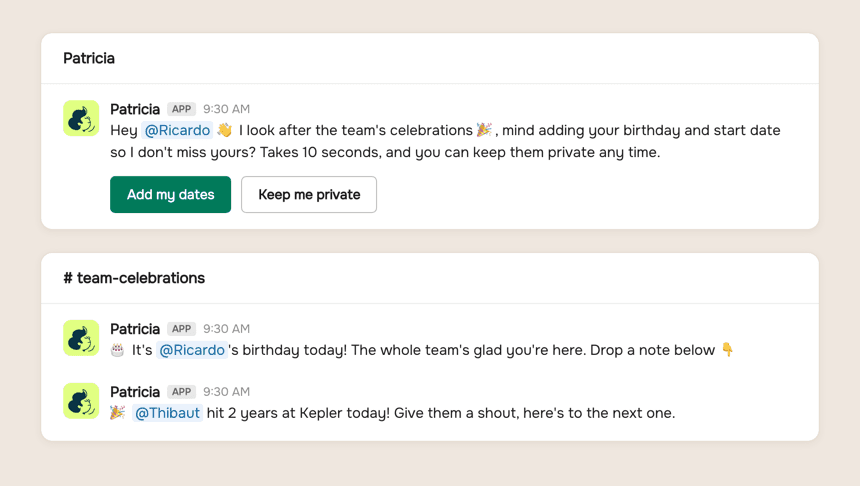
🎂 It's Ricardo's birthday today! The whole team is glad you're here. Drop a note below 👇
🎉 Thibaut hit 2 years at Kepler today! Give him a shout, here's to the next one.

@Pati add Jonah's dates, birthday June 12, started March 3.
Done. Jonah is on the calendar for both. That's 38 of 42 birthdays on file, and I'll ask the last four for their dates myself.
The old way
How agencies do this today.
Every agency means to celebrate its own people. The machinery behind it is usually held together by one person's memory, and that person is on a client deadline.
The spreadsheet someone owns
A birthdays tab, a calendar of reminders, and one owner or ops person who has to notice, write something warm, and post it. On a heavy client week, nothing posts.
The single-purpose bot
A dedicated birthday bot does the posting, but charges per user per month, and that is the only thing it will ever do for you.
The missed anniversary
Birthdays get remembered more than work anniversaries. Three years in, your best account manager's milestone passes quietly, and people notice the silence.
Inside Patricia
What it looks like when she owns it.

Setup
Set up with you in 20 minutes, then it's hers.
Step 1
Add Patricia to Slack
She joins your workspace like any teammate. Two minutes, no engineering.
Step 2
Install the Celebrations skill
One click in her skills catalog. No extra tool, no extra login, nothing new to roll out.
Step 3
Let her collect the dates
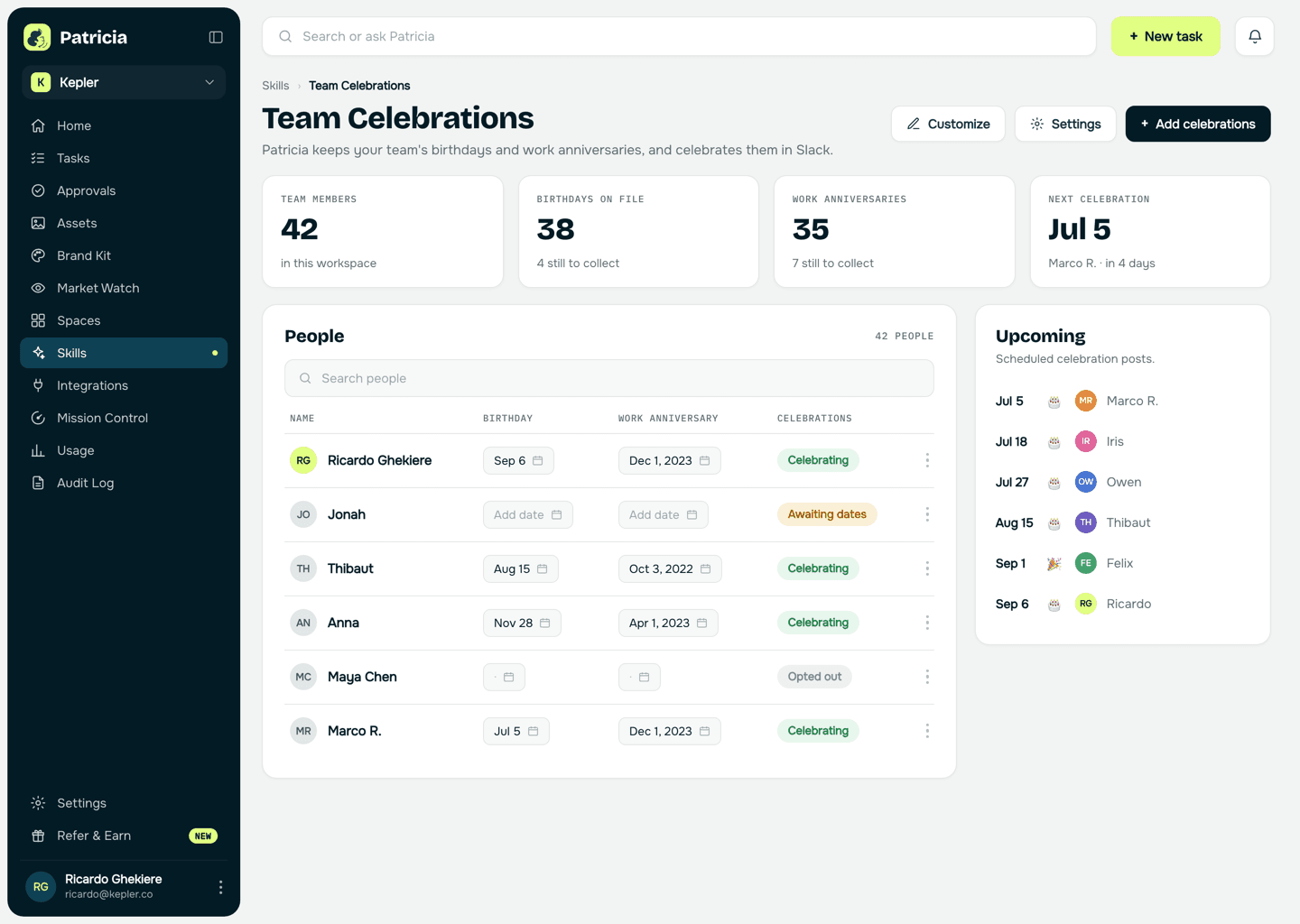
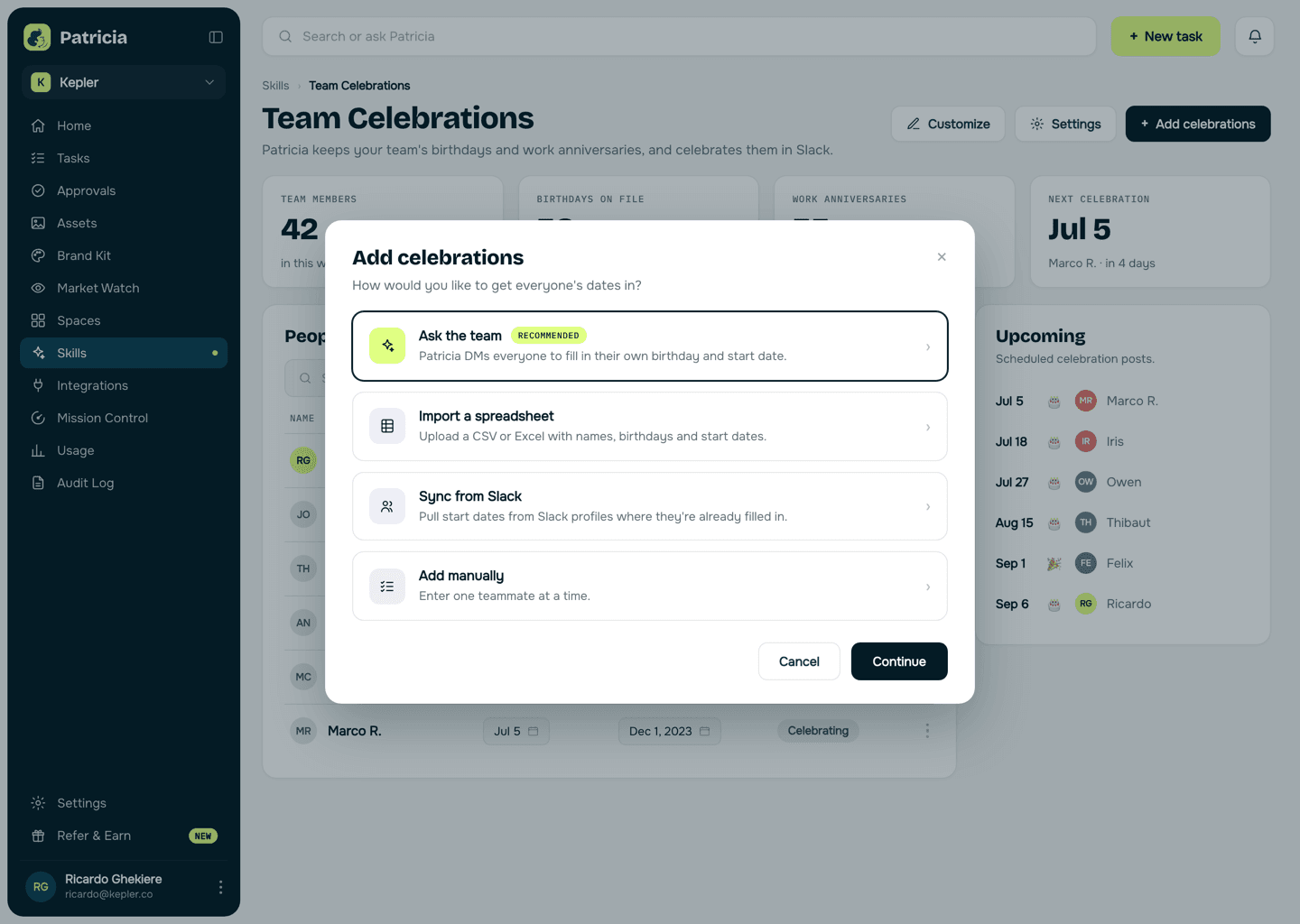
She DMs each teammate for their birthday and start date, or you import a spreadsheet or sync from Slack profiles. Anyone can keep their dates private.
Step 4
She takes it from there
On the day, the post lands in your channel with the message pack you picked. New joiners get asked automatically.
Team celebrations
What she takes off your plate.
Real behavior of the skill, not a feature list.
Collects the dates herself
She DMs each teammate for their birthday and start date. No form to chase, no spreadsheet to own, and a keep-me-private button for anyone who wants out.
Posts on the day
The celebration lands in the channel you chose, at the time you set, with the teammate tagged. Nobody has to remember anything.
Work anniversaries too
Start dates become anniversary posts: two years in, five years in, celebrated the same way birthdays are.
Your voice, not bot voice
Pick a message pack, fun and casual or professional, or write your own messages and she posts them in your agency's voice.
Images and timing, set once
Add an image or GIF to each celebration, choose when posts go out and how she signs them, and it stays that way.
Knows who is missing
The hub shows who is on file, who still owes a date, and who opted out, and she nudges the stragglers herself.
Say it like you'd say it
Things to ask her on day one.
Install the Celebrations skill and post in #team-wins
Add our new hire's dates: birthday June 12, started today
Switch birthday messages to the professional pack
Move celebration posts to 9:30 in the morning
Who has a work anniversary coming up this quarter?
Keep going
One skill down. She has more.
Patricia's value compounds when the whole workflow lives with her, not just one job.

Patricia + Slack
Where the celebrations land, and where she collects the dates. No new surface to adopt.

FAQ
Team celebrations, answered.
How does Patricia collect birthdays and start dates?
She DMs each teammate and asks, which takes about ten seconds per person. You can also import a spreadsheet, sync start dates from Slack profiles, or add people manually. New joiners get asked automatically.
Can someone keep their birthday private?
Yes. The DM has a keep-me-private option, and anyone marked private or opted out is never posted about. The hub shows who opted out so nobody chases them.
Does she handle work anniversaries as well?
Yes. Start dates become anniversary posts, so two years at the company gets celebrated the same way a birthday does. Both run from the same skill.
Can we customize what the posts look like?
Pick a message pack, fun and casual or professional, or write fully custom messages. You can add an image or GIF to each celebration and choose when posts go out and how she signs them.
What does it cost per user?
Nothing per user. Celebrations is a skill included with Patricia, so there is no per-seat fee the way standalone birthday bots charge. It runs on your workspace plan like everything else she does for the agency.
Is this all Patricia does?
No, and that is the point. Celebrations is one installable skill. The same teammate handles the client reporting, the creative briefs, the weekly client updates, and the rest of the work your agency hands her.
One of the jobs teams hand her. See more human resources use cases or browse them all.
Everybody deserves a Patricia.
She handles the work your team never gets to. You build the company. See what changes in your first week.