Never blow a client's ad budget again.
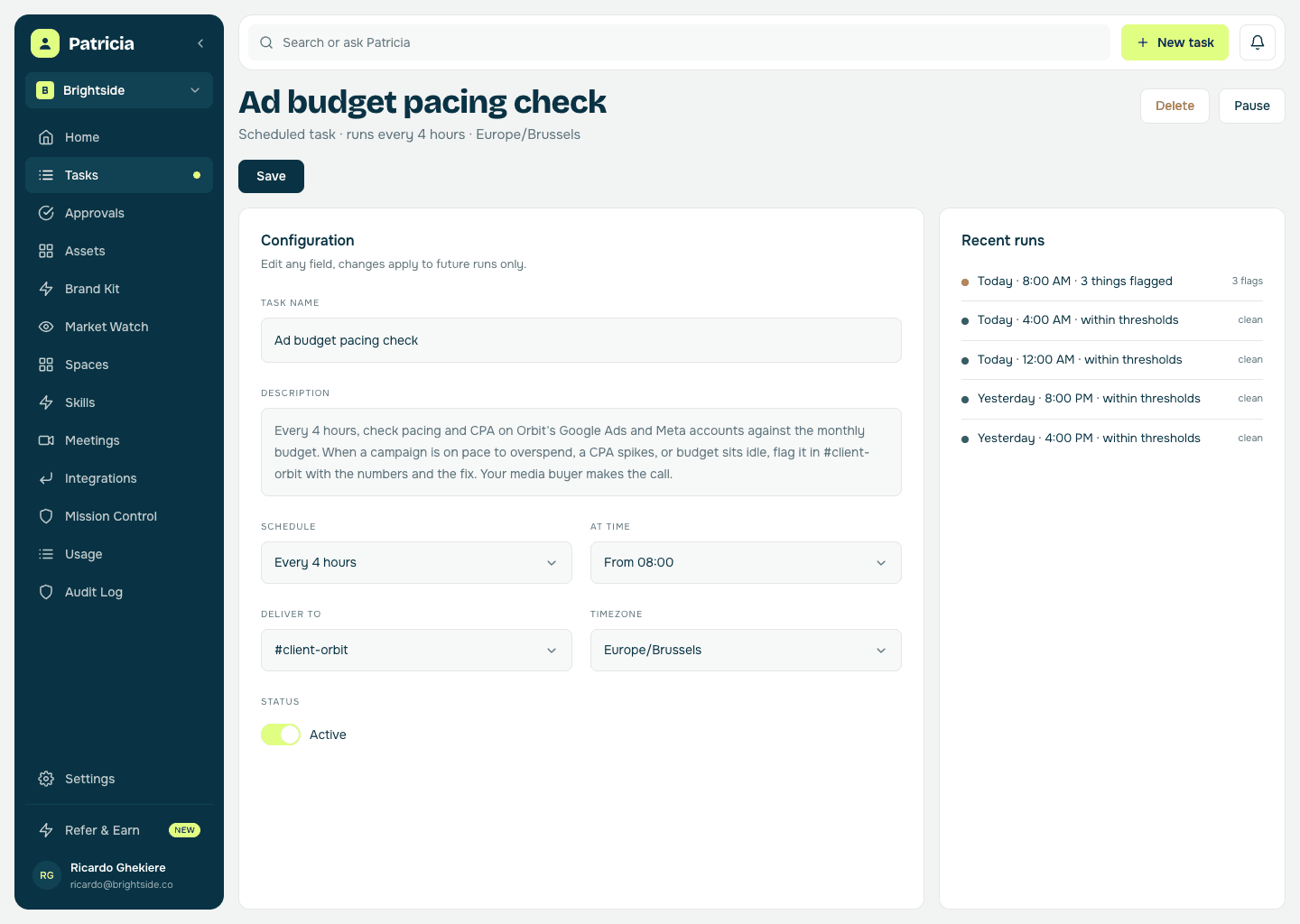
Patricia watches your clients' Google Ads and Meta spend around the clock. The moment a campaign is on pace to overspend, a CPA spikes, or budget is sitting idle, she flags it in that client's channel with what she would do about it. Your media buyer makes the call.
🚨 Orbit pacing check, three things worth a look:
- Meta is on pace to overspend the month by ~18% (£2.1k) at the current rate
- Google Ads CPA jumped 41% overnight on 'Brand - DSA', likely irrelevant search terms slipping in
- Google Ads 'Generic - Search' is underpacing at 44% of budget with 9 days left, held back by ad rank, not budget



@Pati write it up for Thibaut, he's on the Orbit account today.
Done, it's in the thread with the numbers behind each one: a lower daily cap on Meta to bring the month back on pace, a negatives list for the DSA leak, and higher bids on 'Generic - Search' so its idle budget gets spent. Ready for Thibaut to apply in the account. Want this on Friday's client note, or kept internal?
The old way
How agencies do this today.
Pacing is a daily babysitting job on every account and every platform, and the miss you notice is the one that already cost someone money.
The Monday overspend surprise
A client campaign ran hot over the weekend, blew the monthly budget by Wednesday, and nobody saw it until the client read their own invoice.
The budget that sat idle
A campaign underpaced all month, left half the client's budget unspent, and the flat results only made sense when the report was already being written.
The alerts you tuned out
Every platform has its own noisy notifications in a tab nobody checks, times the number of accounts you run, so the CPA spike that mattered got lost with the ones that did not.
Inside Patricia
What it looks like when she owns it.
Setup
Set up with you in 20 minutes, then it's hers.
Step 1
Add Patricia to Slack
She joins your workspace like any teammate. Two minutes, no engineering.
Step 2
Connect the client ad accounts
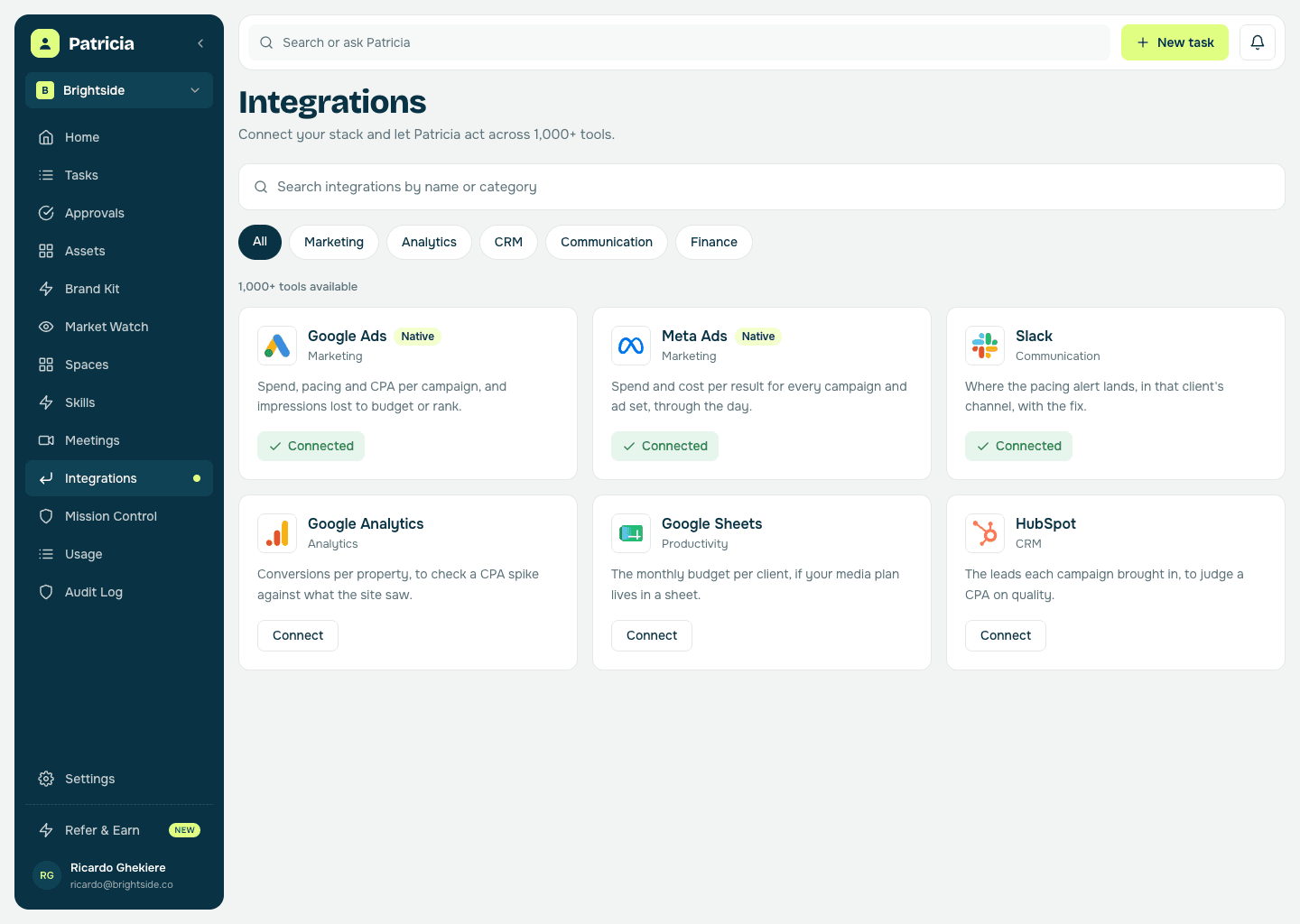
Google Ads and Meta in a click each, so she reads live spend and pacing from every account your agency runs.
Step 3
Set the guardrails per account
The monthly budget, an overspend and underpace threshold, and the CPA moves worth a ping. She learns what normal looks like on each client.
Step 4
She watches and warns
Around the clock. When something is off she flags it in that client's channel with what she would do and why, and your media buyer decides.
Budget pacing & alerts
What she takes off your plate.
Real behavior of the skill, not a feature list.
Watches pacing around the clock
Every client's Google Ads and Meta spend, checked through the day, so a weekend overspend is caught Saturday, not the following Monday.
Catches spikes, not just overspend
A CPA or CPC jump, a conversion drop, a campaign that suddenly eats budget. She flags the anomaly and what most likely caused it.
Flags the idle budget too
Underpacing is a silent loss, and the client notices it in the report. She tells you when a campaign is leaving budget on the table with the month running out.
One alert, every client
Not a noisy notification per platform per account, but one read across Google Ads and Meta, posted in the channel for that client.
Proposes the move, you decide
A lower daily cap, a negatives list, spend shifted to what is working. She writes the recommendation with the numbers behind it. A media buyer makes the change in the account.
No per-account alert tool
Pacing is one thing Patricia does, not a monitoring seat you pay for again every time you take on a client.
Say it like you'd say it
Things to ask her on day one.
Is Orbit on pace to overspend this month?
Alert me if any client's CPA moves more than 20%
Which client campaigns are underpacing with a week left?
Write up the pacing recommendation for the Orbit media buyer
Where is idle budget sitting across our accounts this week?
Keep going
One skill down. She has more.
Patricia's value compounds when the whole workflow lives with her, not just one job.

Patricia + Slack
Where the alert lands the moment a number moves, in that client's channel, and where the team agrees the fix.
FAQ
Budget pacing & alerts, answered.
How does Patricia know a campaign is off pace?
She reads live spend from each client account and projects it against the monthly budget you set. If a campaign is trending to overspend or underpace, or a CPA moves past your threshold, she flags it with the projection and the likely cause.
Does she change anything in the ad account?
Not by default. She reads the accounts, flags what moved, and writes the recommendation with the numbers behind it. Capping a budget, adding negatives or shifting spend is your media buyer's call: approve it in Slack and she applies it, or make the change in the account yourself.
Will it spam the channel?
No. You set the thresholds per account and she only pings when something needs a decision, with one read across the platforms rather than a notification per platform per client.
Which channels does she watch?
Google Ads and Meta, including client accounts under a Google Ads manager account. Connect each client's accounts once and she watches pacing and anomalies across all of them.
Can she watch more than one client?
Yes. Connections are made once for the agency and access is scoped per person, so each client gets its own channel and each account manager sees the accounts they actually work on.
Is this all Patricia does?
No. Pacing is one job. The same teammate handles client reporting, competitor monitoring, call recaps, and the rest of the work your agency hands her, all in the same Slack.
One of the jobs teams hand her. See more campaigns use cases or browse them all.
Everybody deserves a Patricia.
She handles the work your team never gets to. You build the company. See what changes in your first week.