Draft a client's whole social week from Slack.
Patricia drafts the week's posts in the client's voice for Instagram, TikTok and LinkedIn. You approve in Slack, she publishes the LinkedIn posts to a connected profile, and she hands you the rest ready to post, so no calendar goes dark while your team is busy on another account.
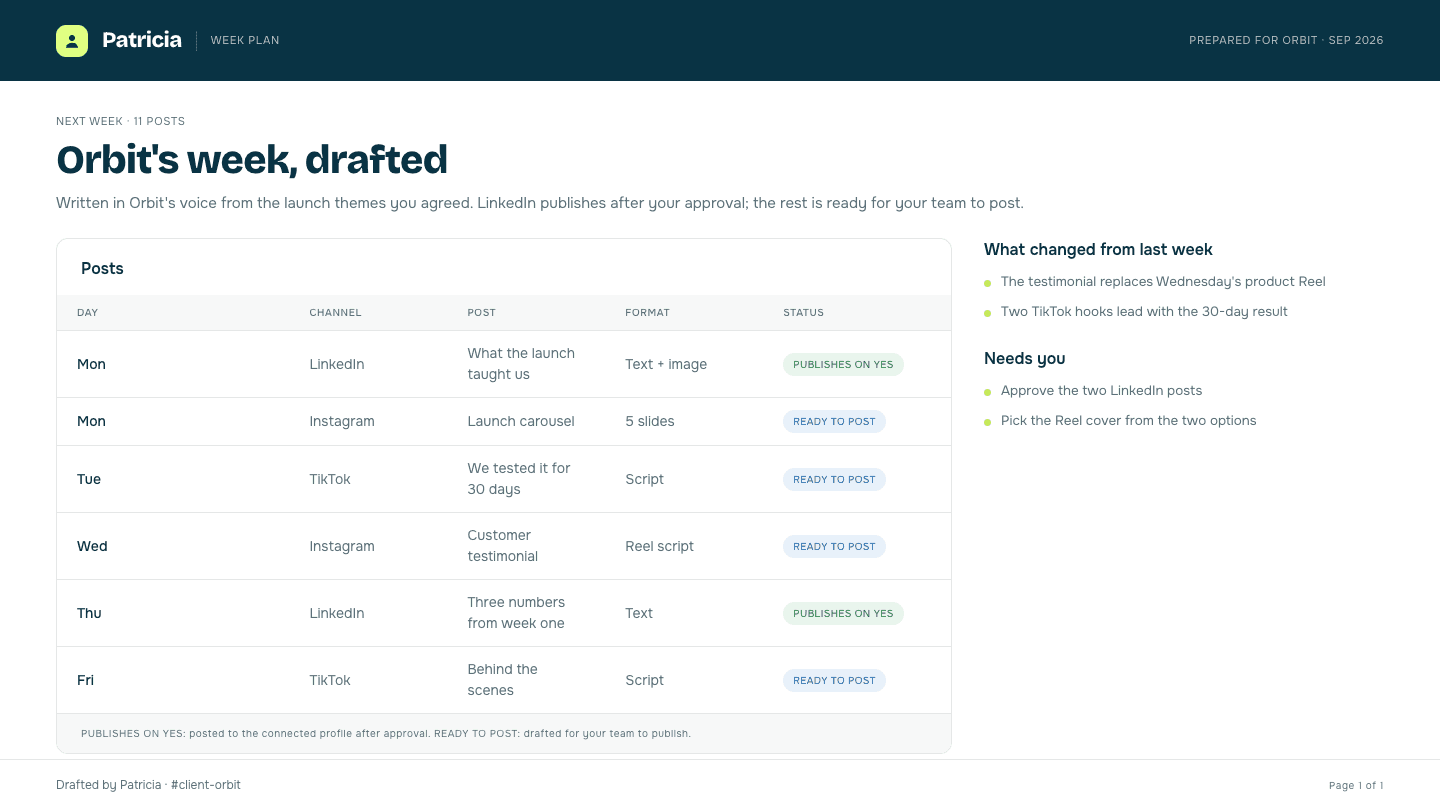
📅 Orbit's next week is drafted:
- 5 Instagram captions and 3 Reel scripts, on the launch story
- 4 TikTok hooks and scripts, on the winning UGC angle
- 2 LinkedIn posts for Ricardo's profile, ready to publish when you approve

@Pati looks good. Swap Wednesday's Reel script for the new testimonial and publish the LinkedIn posts.
Done. The testimonial script is in for Wednesday. Both LinkedIn posts are approved and live on your profile, and the Instagram and TikTok set is in the Orbit folder with the images sized per channel, ready to post.

The old way
How small agencies do this today.
Keeping a client's feed alive means a blank page, a spreadsheet and a folder of captions, times every account on the roster.
The calendar that went dark
Nobody had time to write next week, so a client's feed sat empty for four days and the client was the one who noticed.
The blank page every Monday
Eight captions in the client's voice have to exist before anything can be scheduled, and they get written last, in a hurry.
Copy-paste across three tools
Draft in a doc, paste into a scheduler, resize for each platform, and hope the right caption went with the right asset. Then do it again for the next account.
Inside Patricia
What it looks like when she owns it.
Setup
Set up with you in 20 minutes, then it's hers.
Step 1
Add Patricia to Slack
She joins your workspace like any teammate. Two minutes, no engineering.
Step 2
Give her the plan
Their themes, their cadence and their brand voice. She drafts the week from the calendar you agreed with the client.
Step 3
Connect LinkedIn to post there
Each person connects their own LinkedIn profile, and she publishes to it only after an approval in Slack.
Step 4
Approve the week
You OK the drafts in Slack. She publishes the approved LinkedIn posts and hands you the rest ready to post.
Social content
What she takes off your plate.
Real behavior of the skill, not a feature list.
Drafts the whole week
Posts, captions, hooks and scripts per platform, built from the client's themes and their brand voice, so you edit a draft instead of staring at a blank calendar.
Sized for each channel
Images made to feed, Story and tall video sizes, and copy cut to each platform's length, so nothing gets squeezed at the last minute.
Publishes on LinkedIn
Text and links with one image, posted to a connected person's own profile or a company page once you approve it.
Keeps the calendar full
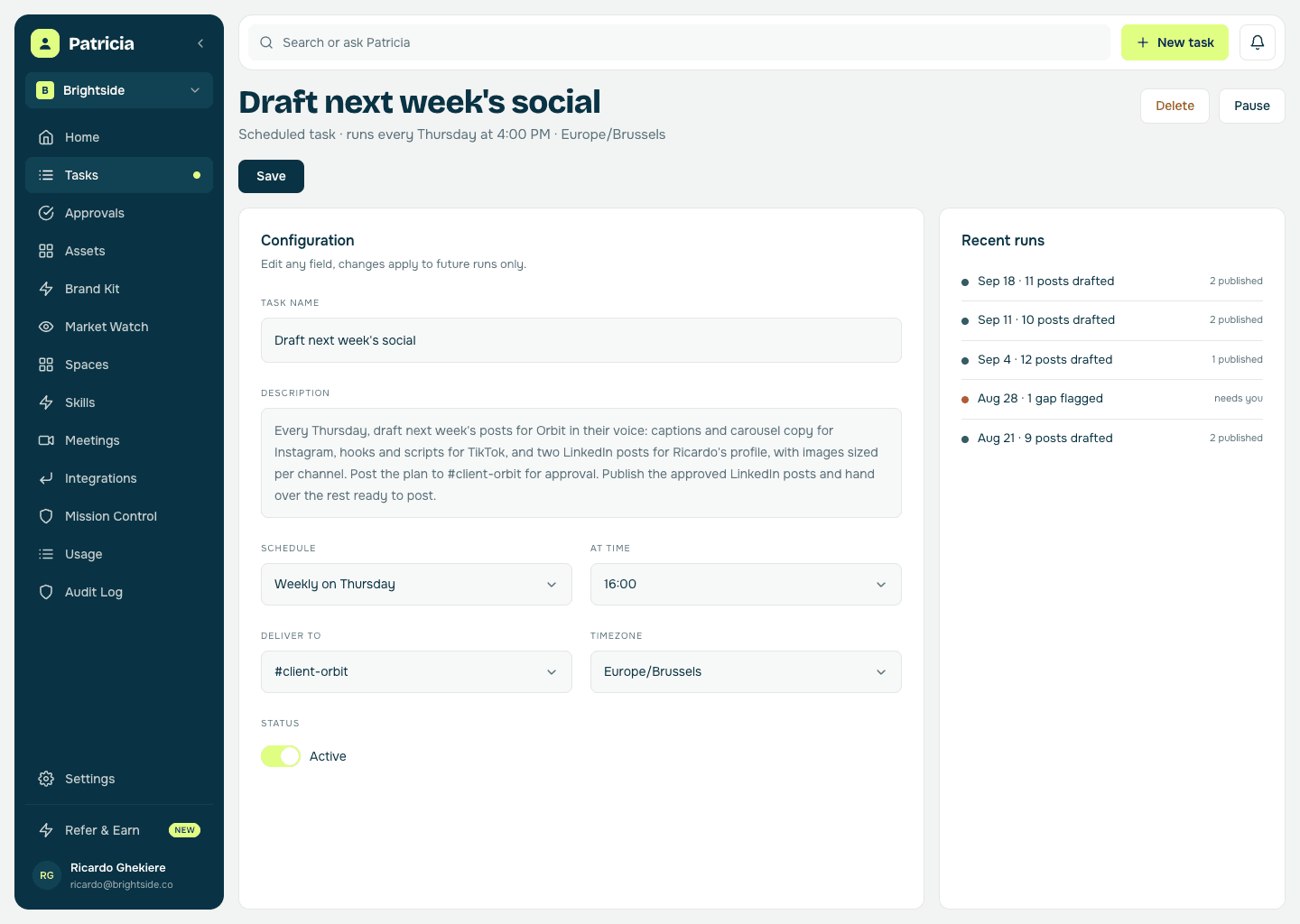
A weekly task drafts next week before this one runs out and flags the gaps, so no client's feed goes quiet while your team is heads-down elsewhere.
Nothing posts without a yes
Every post waits for a named person to approve it, and that approval cannot be switched off.
One teammate for every account
Drafting is one thing Patricia does across every client, not another tool and another seat per person.
Say it like you'd say it
Things to ask her on day one.
Draft next week's posts for Orbit
Write three hooks for Orbit's launch TikTok
Swap Wednesday's Reel script for the new testimonial
Turn the case study into two LinkedIn posts for Ricardo's profile
Resize the launch visual for a Story and a 4:5 feed post
Keep going
One skill down. She has more.
Patricia's value compounds when the whole workflow lives with her, not just one job.



Patricia + Slack
Where you approve the week and where she hands over the finished posts.
FAQ
Social content, answered.
Does Patricia publish the posts herself?
On LinkedIn, yes: to a connected person's own profile or a company page you switched on, after your approval. For Instagram, TikTok and the other channels she drafts the post and the image and hands them to you to publish.
Does she schedule posts to go out at a set time?
Not today. She drafts the week to the plan you agreed and publishes an approved LinkedIn post when you approve it. Timed publishing is not something she does yet.
Can she write the posts too?
Yes. She drafts the week from the client's themes and brand voice, captions, hooks and scripts per platform, so you edit a draft rather than start from a blank calendar.
Does anything publish without approval?
No. Every LinkedIn post waits for a named yes, and you can hold one back or rewrite it in a Slack reply.
What if I want to change something?
Reply in Slack. Swap a post, rewrite a caption or change a format, and she updates the draft. No separate tool to log into.
Is this all Patricia does?
No. Social is one job. The same teammate handles the client report, competitor monitoring, and the rest of the work your agency hands her, all in the same Slack.
One of the jobs teams hand her. See more content & social use cases or browse them all.
Everybody deserves a Patricia.
She handles the work your team never gets to. You build the company. See what changes in your first week.