
Budget pacing on Meta, explained with numbers, then automated for free with a Google Sheet, Apps Script and a Slack webhook.
Meta Ads budget pacing compares month-to-date spend with the spend you'd expect for the days elapsed: expected spend = monthly budget × days elapsed ÷ days in the month. Divide actual spend by expected spend for the pacing percentage, and project the month-end as spend ÷ days elapsed × days in the month. Alert when pacing leaves a band, for example above 110% or below 85%.
Meta budgets are set per campaign or ad set, by day or lifetime, while a client's budget is usually one number per month. So the alert has to be built on top. Below: the math with a worked example, a free Google Sheet and Apps Script that calls the Marketing API and posts to Slack, an n8n version, and how Patricia runs the same check for every client in Slack or Microsoft Teams.
Checked against Meta and Google docs on 3 Nov 2026The pacing formula
What you should have spent by now if spend were even across the month. Client A: $10,000 × 17 ÷ 30 = $5,666.67
Over 100% runs hot, under 100% runs slow. Client A: $6,800 ÷ $5,666.67 = 120%
Where the month lands if the current daily rate holds. Client A: $6,800 ÷ 17 × 30 = $12,000
The daily spend that lands the month exactly on budget. Client A: ($10,000 − $6,800) ÷ 13 = $246.15
Count complete days only. On the morning of 18 November, "days elapsed" is 17, and spend runs from 1 to 17 November in the ad account's time zone. Counting today's half day makes every account look behind.
A worked example: November 2026
Two demo clients, each with a $10,000 monthly Meta budget. November has 30 days. The check runs on 18 November, with 17 complete days.
| Number | Client A (hot) | Client B (slow) |
|---|---|---|
| Spend 1 to 17 Nov | $6,800 | $4,000 |
| Expected by now (10,000 × 17 ÷ 30) | $5,666.67 | $5,666.67 |
| Pacing | 120% | 71% |
| Current daily rate | $400.00 | $235.29 |
| Projected month-end | $12,000.00 | $7,058.82 |
| Needed per day for the last 13 days | $246.15 | $461.54 |
| What to do | Cut daily budgets by about 38% | Find what's holding delivery back, then raise budgets |
Both are problems. Client A gets an invoice 20% over plan. Client B gets a flat month and a report that only makes sense once it's too late to fix. The "needed per day" line is what makes an alert useful: it tells the media buyer the size of the correction.
Which thresholds to alert on
- Over 110% or under 85% of even pace is our starting band for most clients. The band is wider on the low side because an overspend costs the client money they didn't approve, while a slow week can still be made up.
- Tighter in the last 7 days. On day 25, a 10% gap leaves 5 days to close it. We'd tighten the band to ±5% in the final week (our suggestion).
- Uneven months. If the plan puts 40% of the budget in a sale week, even pacing will cry wolf. Replace "days elapsed ÷ days in month" with the share of budget planned to date.
Why Meta accounts drift off pace
- Daily budgets work as an average. On Meta, delivery can spend above a daily budget on some days and below it on others (see Meta's help page About daily budgets). Judge pacing on month-to-date spend, never on one day.
- Budget edits mid-month. A daily budget raised for a launch and never lowered is the classic overspend.
- Delivery stops. A failed payment, a rejected ad or an ad set stuck with too few results shows up as underpacing.
- Several campaigns, one client budget. Each campaign can look fine while the account total runs hot. Pace the account against the client's number.
The free method: Google Sheet + Apps Script + Slack
The script reads each client's month-to-date spend from the Marketing API ad account insights endpoint (/act_<ID>/insights with level=account, fields=spend,account_currency and a time_range from the 1st to yesterday), applies the formula, and posts to Slack when a client leaves the band. It runs inside Google Sheets, costs nothing, and changes nothing in any ad account.
Step 1. List each client's budget in a sheet
Create a Google Sheet with a tab named Budgets. Row 1 holds headers, then one client per row:
| A: Client | B: Ad account ID | C: Monthly budget | D: Slack webhook (optional) |
|---|---|---|---|
| Orbit | 1234567890 | 10000 | https://hooks.slack.com/services/… |
Put the budget in the ad account's currency. Column D sends each client's alert to its own channel; leave it empty to use one shared channel.
Step 2. Get a Meta access token with ads_read
Meta's authorization guide lists ads_read as the permission for reading ad reports. In Meta Business Settings, create a system user, give it access to the client ad accounts, and generate a token for your app with ads_read. A system user token doesn't depend on one person's login, which matters when a media buyer leaves.
Step 3. Create a Slack incoming webhook
At api.slack.com/apps, create an app, switch on Incoming Webhooks, click Add New Webhook to Workspace, pick the channel and copy the URL. Slack's guide warns the URL "contains a secret", so keep it out of shared docs.
Step 4. Paste the Apps Script
In the sheet, open Extensions, then Apps Script, delete the sample code and paste the script. Connect with Thibaut on LinkedIn below and he sends it to you, with the setup steps. Replace the value of GRAPH_VERSION with the newest version in Meta's changelog; on 3 November 2026 that was v26.0, released 29 July 2026.

Hi, connect with me on LinkedIn
Send me a message that says "Meta pacing script" and I send you the full script with the setup steps.
Connect with Thibaut on LinkedInStep 5. Add script properties and the time zone
In the Apps Script editor, open Project Settings. Under Script Properties, add META_TOKEN (your token) and SLACK_WEBHOOK_URL (the default channel). Keeping them out of the code means a shared sheet doesn't share your token. Set the project time zone to the one your ad accounts report in, because Meta counts days in the ad account's time zone.
Step 6. Run it once and authorize
Set POST_WHEN_ON_PACE = true, select checkPacing and click Run. Google asks you to allow access to the sheet and to external services; approve it. Every client should get a line in Slack. If an error message shows "code":190, the token is wrong or expired; "code":200 means a permission is missing for that account.
Step 7. Schedule it every morning
Select installTrigger and run it once. It creates a time-driven trigger that runs checkPacing every morning around 8:00 (Apps Script installable triggers). Set POST_WHEN_ON_PACE back to false so only real drift posts. Test it on one account first, then add the other clients to the sheet.
The same flow in n8n
If your agency already runs n8n, build it as five nodes: a Schedule Trigger every morning, a Google Sheets node that reads the Budgets tab, an HTTP Request node (or n8n's Facebook Graph API node, with node act_<ID> and edge insights) that calls the same endpoint, a Code node with the four formula lines, and an IF node into Slack. The Graph API node asks for the API version on each request, so pick the current one there too.
Where the free method stops
- Meta only, account totals only. It doesn't see Google Ads or LinkedIn Ads, and it doesn't say which campaign is running hot. Add
level=campaignto the request for a campaign split. - Spend is an estimate. Meta's insights reference labels
spendas an estimated metric, so the last day can move a little after the fact. - Once a day. A weekend spike is caught the next morning. A second trigger every few hours with today's spend would catch it sooner, at the cost of noisier alerts.
- No CPA view. It knows how fast you spend, not whether the spend works. A client can pace perfectly on a CPA that doubled.
- Token and version upkeep. Tokens get revoked when people or apps change, and Meta retires old API versions on a schedule. Someone has to own both.

Pacing alerts with Patricia, in Slack or Teams
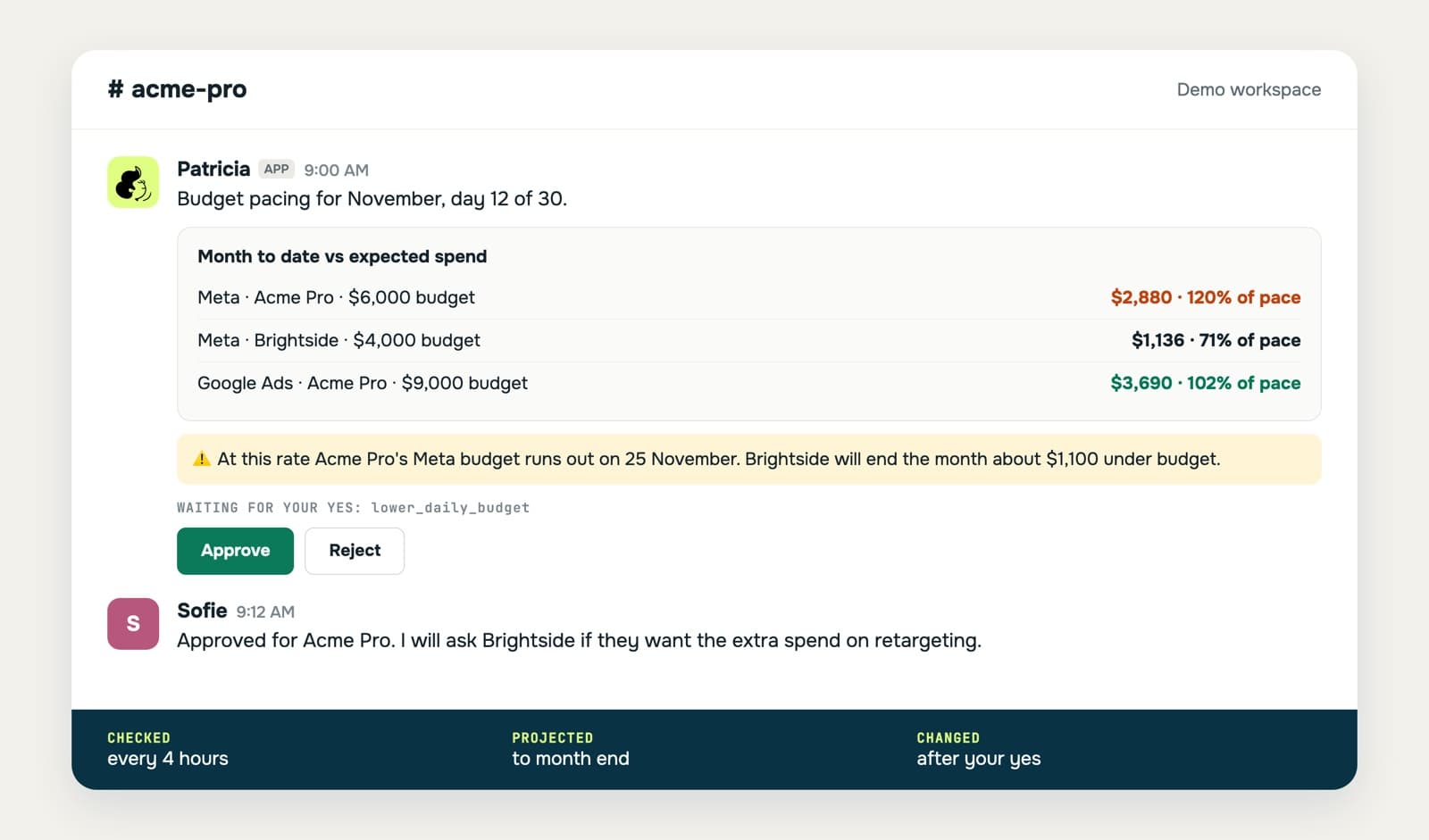
Patricia, our AI coworker for small marketing agencies, runs the pacing check for every client across Google Ads and Meta, and posts in that client's Slack or Microsoft Teams channel when something needs a decision. You set the monthly budget, the overspend and underpace thresholds and the CPA moves worth a ping, per account. The budget can come from the Google Sheet where your media plan already lives.
Beyond the account total, she names the campaign that's on pace to overspend, a CPA or CPC spike with its likely cause, and budget sitting idle with the month running out, with the projection behind each one. Then she writes the recommendation: a lower daily cap, a negatives list, spend moved to what works. It covers client accounts under a Google Ads manager account too. Her separate Ad Anomaly Watch checks Google Ads, Meta Ads and LinkedIn Ads every morning for spend spikes, tracking breaks and rejected ads.
Where it stops: she reads the accounts and proposes; the media buyer decides. By default she asks before she spends ad budget, so a budget change waits for a yes in Slack, and the buyer can also make it in the account directly. Pacing on LinkedIn Ads isn't part of this check today; LinkedIn is covered by the daily anomaly watch.
Cost: the Founding plan is $45 a month per workspace, every seat included, with 20,000 credits every month that roll over. Every task shows a typical cost before you schedule it, and the Automations page shows the credits each check has used since. See budget pacing alerts and pricing.
How we built this guide
- We wrote the script from Meta's and Google's documentation and ran it against mock Apps Script objects to check the math and the message. We didn't run it on a live ad account for this page. Test it on one account first.
- Docs read on 3 Nov 2026: Meta ad account insights, Graph API changelog, Marketing API authorization, n8n Facebook Graph API node, Google Ads budgets, Slack incoming webhooks.
- The worked example uses demo clients and round numbers.
FAQ
What is budget pacing in Meta Ads?
Budget pacing is how fast an ad account spends against the budget planned for a period, usually the client's month. You compare spend to date with the spend you'd expect for the days that have passed, and you project where the month will end at the current rate.
How do you calculate ad spend pacing?
Expected spend = monthly budget × days elapsed ÷ days in the month. Pacing = actual spend ÷ expected spend. Projected month-end = actual spend ÷ days elapsed × days in the month. Daily spend needed to land on budget = (budget − spend) ÷ days left.
What pacing percentage should trigger an alert?
A common starting point is above 110% or below 85% of an even pace, then tighter in the last week of the month, when there's little time left to correct. Tune it per client: a client who accepts 5% over needs a tighter band than one who only cares about the quarter.
Why does Meta spend more than my daily budget on some days?
On Meta, a daily budget works as an average, and delivery can spend above it on days with more opportunities. That's why pacing should be judged on month-to-date spend, not on one day. Check Meta's help page on daily budgets for the current rule.
Can I pull Meta Ads spend into Google Sheets for free?
Yes. An Apps Script can call the Marketing API insights endpoint for each ad account with a token that has the ads_read permission, and write or post the spend. The free script from this guide does that and posts to Slack.
Does the same pacing math work for Google Ads?
Yes. Google Ads says a campaign can spend up to twice its average daily budget on a given day, but no more than 30.4 times the average daily budget in a month. The monthly pacing formula is the same. For Google Ads alerts in Slack, see our free Google Ads script.
Which Marketing API version should I use?
The newest one in Meta's changelog. On 3 November 2026 that was v26.0, released 29 July 2026. Meta retires old versions on a schedule, so check the changelog and update the version in the script when you set it up.
Growth Manager at Patricia. He runs Patricia's SEO, AI visibility and YouTube, and the paid media checks agencies hand to Patricia.