
A free, copy-paste way to get Google Ads spend and conversion alerts in a Slack channel, with the limits you should know before you trust it.
To get Google Ads anomaly alerts in Slack, create a Slack incoming webhook, paste a Google Ads script that compares yesterday's spend and conversions with the 14 days before it, and schedule the script to run every morning. The script Thibaut sends you on LinkedIn does exactly that for free: it posts only when a number crosses your threshold, and it changes nothing in the account.
If you'd rather not keep code alive, Zapier can pass a scheduled Google Ads report to Slack, and an AI coworker such as Patricia watches Google Ads, Meta Ads and LinkedIn Ads every morning and posts each flag with its likely cause. Both are covered below.
Checked against Google and Slack docs on 3 Nov 2026Your options at a glance
| Method | Cost | Lands in Slack | Setup (our estimate) | Platforms |
|---|---|---|---|---|
| Google Ads script + Slack webhook (this guide) | Free | Yes | 20 to 30 minutes per account | Google Ads, one account per script |
| Google Ads automated rules | Free | No, email | About 10 minutes | Google Ads |
| Zapier (schedule, Google Ads report, filter, Slack) | Depends on your Zapier plan | Yes | About 30 minutes | Google Ads (no spend trigger of its own) |
| Patricia's Ad Anomaly Watch | $45 a month per workspace, 20,000 credits included | Slack or Microsoft Teams | Dedicated onboarding | Google Ads, Meta Ads, LinkedIn Ads |
Zapier's Google Ads triggers and actions checked on zapier.com on 3 Nov 2026. Setup times are our estimates.
What counts as an anomaly
An alert you ignore is worse than no alert. Three false alarms and people stop reading the channel, so the script flags only moves that need a person, and it only judges complete days. A half-finished "today" compared with full days always looks like a drop.
| Check | Flags when | Default | Usual cause |
|---|---|---|---|
| Spend spike | Yesterday's spend is above normal by more than SPIKE_PCT | 100%, so double the 14-day average | A budget raised by mistake, a broad match keyword let loose, a new campaign |
| Spend stop | Yesterday's spend is under STOP_PCT of normal | 20% | A failed payment, a paused campaign, disapproved ads, an end date |
| Tracking break | Zero conversions yesterday while spend was at least half of normal | Only if normal is 3+ conversions a day | A removed tag, a site release, a consent banner change |
| CPA drift | Last 7 days' CPA is worse than the 7 days before by more than CPA_DRIFT_PCT | 25%, with 20+ conversions in each week | Rising CPCs, a weaker landing page, a bid strategy change |
| Today's cap (optional) | Spend so far today passes TODAY_SPEND_CAP | Off | For hourly runs on accounts that can burn a budget in a morning |
The 25% drift and the 20-conversion minimum are the defaults Patricia's own anomaly watch uses on Google Ads. Below 20 conversions a week, a CPA swing is mostly noise.
Google Ads check: Acme Pro (123-456-7890)
- Spend spike on 2026-11-02: USD 1912.40 vs USD 846.10 a day normally
- Zero conversions on 2026-11-02 with USD 1912.40 spent (normal: 11.4 a day). Check the conversion tag.
The message format the free script posts. Demo account and numbers.
Set it up in 6 steps
Step 1. Create a Slack incoming webhook
- Go to api.slack.com/apps, click Create New App, pick a name such as "Google Ads alerts" and your workspace.
- Open Incoming Webhooks and switch on Activate Incoming Webhooks.
- Click Add New Webhook to Workspace, choose the alert channel (one per client works well), then Authorize. For a private channel, you must be a member first.
- Copy the URL. It looks like
https://hooks.slack.com/services/T000/B000/XXXX.
Per Slack's webhook guide, the URL "contains a secret". Anyone holding it can post to that channel, and Slack revokes webhook URLs it finds leaked online.
Step 2. Create a new Google Ads script
In Google Ads, open Tools in the left menu, then Bulk actions, then Scripts (or search "Scripts" in the Google Ads search bar). Click the plus button to add a new script and name it "Slack anomaly alerts". The path comes from Google's getting-started guide.
Step 3. Paste the script and set your thresholds
Connect with Thibaut on LinkedIn below and he sends you the script, with the setup steps. Delete the sample code, paste the script, and put your webhook URL in SLACK_WEBHOOK_URL. Change only the constants at the top.

Hi, connect with me on LinkedIn
Send me a message that says "Google Ads script" and I send you the full script with the setup steps.
Connect with Thibaut on LinkedInHow it reads the account: one AdsApp.search query on the customer resource returns spend (metrics.cost_micros, divided by 1,000,000) and conversions per day for the last 15 complete days. Dates come from the account's own time zone through getTimeZone(), so a New York account isn't judged on a London day. A day with no row counts as zero spend, which is how the spend stop gets caught.
Step 4. Authorize, then preview
- Click Authorize when Google asks. Each script needs this once.
- Set
POST_WHEN_CLEAN = truefor the first run, so you get a message even on a quiet day. - Click Preview. Open Logs: you should see
Slack answered 200: ok, and the message in your channel.
Preview still posts to Slack. Google's preview docs say preview only changes the behavior of calls made through AdsApp, and other services run as normal. This script makes no changes through AdsApp, so preview and a real run do the same thing. Set POST_WHEN_CLEAN back to false afterwards.
Step 5. Schedule it: daily, or hourly with a cap
On the Scripts page, set the frequency in the script's row. Google lists hourly, daily, weekly and monthly schedules (Google Ads scripts overview).
- Daily, early morning in the account's time zone. The right default. The four checks judge yesterday, and yesterday only changes once a day.
- Hourly, for accounts that can burn a budget before lunch. Set
TODAY_SPEND_CAPto the most you'd accept in one day, andDAILY_CHECK_HOURto 8 so the four daily checks post once, at 8:00, instead of every hour. The cap alert repeats each hour while spend stays above it, which is usually what you want.
Step 6. Force one test alert
Set TODAY_SPEND_CAP = 1 and click Run on an account that spent anything today. Slack should show "Today so far: ... above your cap of USD 1.00". Set the cap back to 0 or your real number. Test it on one account first, read a week of alerts, then copy it to the next client.
Where the free script stops
- One account per script. As written, it checks the account it lives in. From a manager (MCC) account, rewrite
main()withAdsManagerAppto loop over client accounts, and keep the 30-minute run limit in mind. - Yesterday, not now. The daily checks catch Tuesday's problem on Wednesday morning. Only the optional cap watches today.
- Conversions still arriving. Google Ads credits a conversion to the day of the click, so a lead that converts three days later lands on an old date. On long sales cycles, the zero-conversion check can fire early. Raise
MIN_NORMAL_CONVor turn that check off. - Double-counted conversions.
metrics.conversionsadds up every primary conversion action. If two primary actions fire for one sale, the CPA check works on doubled numbers. Patricia's watch counts only the conversion you name as the real result for this reason. - Account totals only. A spike in one campaign hides inside a flat account. Swap
customerforcampaignin the query and group bycampaign.nameif you need campaign-level flags. - No cause, no next step. The message says what moved. Someone still has to open the account and find out why.
- A paused account alerts every day as a spend stop. Pause the script when you pause the account.

Three alternatives to a script
Google Ads automated rules (free, email only)
Automated rules live under Tools, Bulk actions, Rules. Per Google Ads Help, they make account changes on a schedule (status, budget, bids) and can email you the results. They're fine when the person who should react reads email. They don't post to a Slack channel, and they don't compare a day with a trailing average the way the script does.
Zapier (paid, no spend trigger)
On 3 Nov 2026, Zapier's Google Ads app listed two triggers, New Campaign and New Lead Form Entry, and a Create Report action. No trigger fires on spend. A spend alert therefore needs a scheduled Zap: a schedule step, then Google Ads Create Report, then a filter on your threshold, then a Slack message. It works without code, uses Zapier tasks on every run, and the comparison with a 14-day average has to be built in a code or formatter step.
Patricia's Ad Anomaly Watch
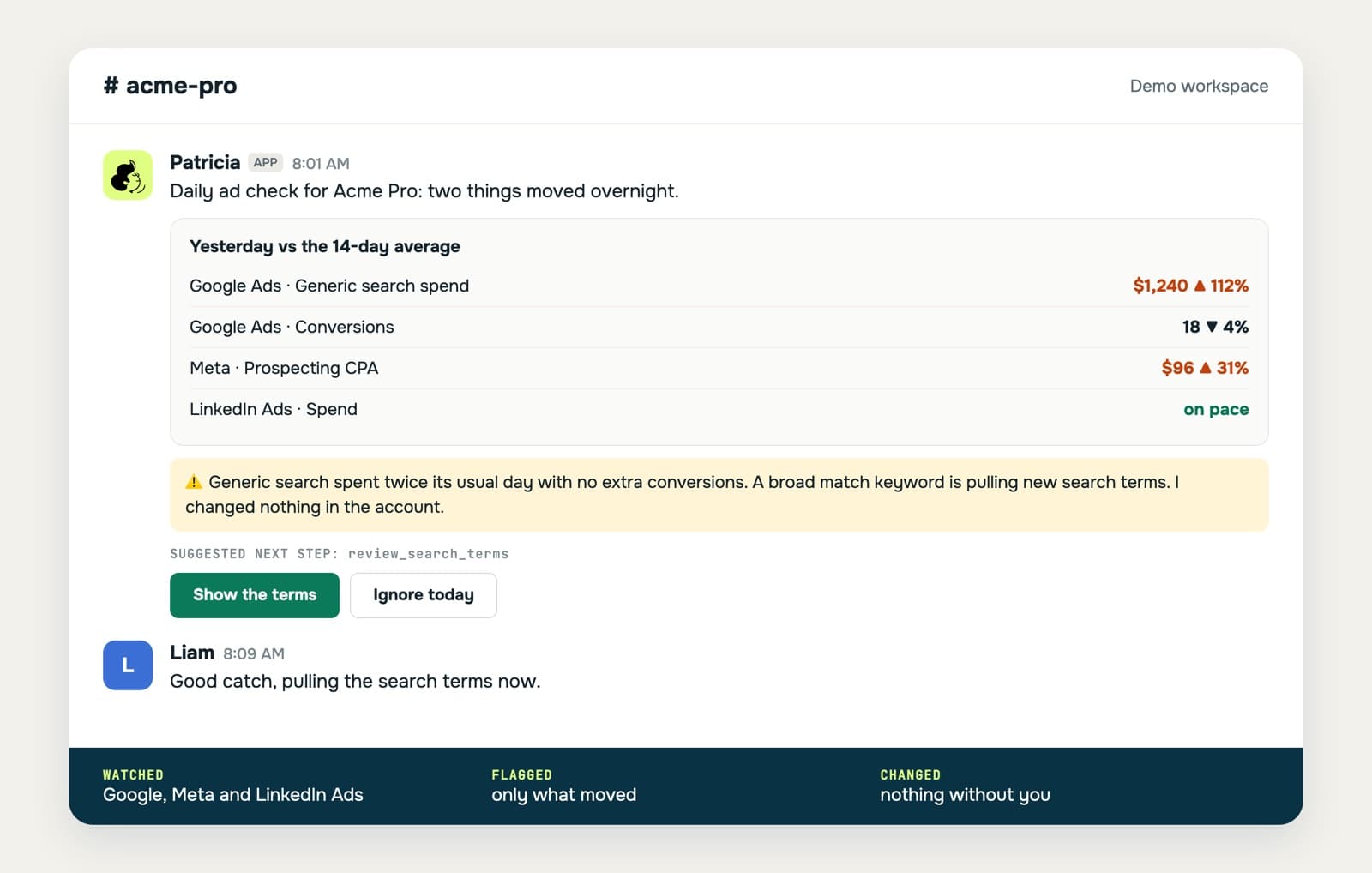
Patricia, our AI coworker for small marketing agencies, runs an Ad Anomaly Watch on Google Ads, Meta Ads and LinkedIn Ads every morning (8:00 by default) and stays silent on a quiet day. When something is wrong she posts in Slack or Microsoft Teams, in the client's channel. Each flag carries the platform, the numbers, the window they cover, the likely cause and one suggested action.
She runs nine checks: account status (a failed payment, a billing hold), spend spike, spend stop, tracking break, CPA or ROAS drift, a campaign past the floor you agreed with the client, spend with no result, disapproved or rejected ads, and landing pages that return a 404 or a server error. She works on complete days in each account's time zone, counts only the conversion you name as the real result, and judges each platform on its own, so a sale claimed by Google and by Meta isn't counted twice. Defaults: a spike at 100% above normal, drift at 25% with at least 20 conversions in each window.
Where it stops: the watch reads and proposes; it changes nothing in any ad account. A budget change she suggests goes to the skill that owns budgets and, by default, waits for a yes in Slack before she spends ad budget. It runs once a day, so for an intra-day cap keep the script's hourly guard. On LinkedIn Ads she can't read the change history, so a LinkedIn cause comes from campaign status, budgets and serving holds. Meta and LinkedIn results keep arriving for days after a click, so her recent window on those platforms ends two days back.
Cost: the Founding plan is $45 a month per workspace, every seat included, with 20,000 credits every month that roll over. On BetterPic's own account in October 2026, a daily watch run used about 467 credits (about $1.05). See pricing, the Google Ads page and budget pacing alerts.
Meta Ads and LinkedIn Ads alerts
Most agencies run more than Google. The script idea carries over: the Meta Marketing API's insights endpoint returns spend per day for an ad account, and LinkedIn's reporting API does the same for campaigns, so the same compare-and-post logic works with a different fetch. For Meta, our Meta Ads budget pacing guide has a free Google Sheet and Apps Script version that posts to Slack.
Keep each platform on its own. Google, Meta and LinkedIn each claim conversions the others also claim, so judge each account against its own normal and its own target, and never add their conversions together.
How we built this guide
- We wrote the script from Google's documentation and ran it against mock Google Ads objects to check the logic. We didn't run it on a live account for this page. Test it on one account first.
- Docs read on 3 Nov 2026: Google Ads scripts getting started, scripts overview, preview mode, reports, Account reference, Slack incoming webhooks, Zapier Google Ads + Slack, Google Ads automated rules.
- Patricia's checks and defaults come from her Anomaly Watch skill and its settings as they ship on 3 Nov 2026.
FAQ
Can Google Ads send alerts to Slack on its own?
Google Ads automated rules can change bids, budgets or status on a schedule and email you the results. To get the alert in a Slack channel, use a Google Ads script that posts to a Slack incoming webhook, a Zapier flow, or an AI coworker such as Patricia.
How often can a Google Ads script run?
Google's documentation lists hourly, daily, weekly and monthly schedules, plus runs on demand. A single-account script can run for up to 30 minutes.
Does this script change anything in my Google Ads account?
No. It only reads spend and conversions and posts a message to Slack. Preview mode only holds back changes made through AdsApp, so the Slack post goes out during a preview too.
Does it work on a manager (MCC) account?
As written, it checks the one account it runs in. Add it to each client account, or rewrite main() with AdsManagerApp to loop over client accounts from a manager account.
Is it safe to paste a Slack webhook URL into a Google Ads script?
Slack says the webhook URL contains a secret: anyone who has it can post to your channel. Keep the script in your own account, never in a public repository, and create a new webhook if the URL leaks.
What counts as a Google Ads anomaly?
A move large enough to need a person: spend double its normal level, spend under 20% of normal, zero conversions on a normal spend day, or a CPA 25% worse week on week with at least 20 conversions in each week. Tune each threshold per account.
Can I get Meta Ads and LinkedIn Ads alerts in Slack too?
Yes. The same idea works with the Meta Marketing API and LinkedIn's reporting API, each with its own script. Patricia's Ad Anomaly Watch checks Google Ads, Meta Ads and LinkedIn Ads every morning and posts the flags in Slack or Microsoft Teams.
Growth Manager at Patricia. He runs Patricia's SEO, AI visibility and YouTube, and watches BetterPic's own Google Ads account with the same checks this page describes.