
The main Zapier Agents alternatives for an agency are Make and n8n if you want to keep building the workflows yourself, Gumloop and Relevance AI for no-code agents, Lindy and Viktor for one AI employee across the company, and Patricia for an AI coworker in Slack or Teams that already runs agency jobs such as client reports and anomaly watch.
We make Patricia, so weigh that. Every competitor price and feature below comes from that vendor's own site, checked on 18 November 2026.
Checked 18 Nov 2026What does Zapier Agents do well, and why do agencies look elsewhere?
Zapier Agents lets you build AI agents that act across the 9,000+ apps Zapier already connects. It is free to start, and the Pro plan is about $33.33 a month billed yearly. Agencies look elsewhere when nobody wants to build and maintain each agent, or when the activity cap is too tight.
Zapier's pitch is "Create your own superhuman teammates in minutes." Its Agents page shows a Chrome extension and templates such as an SEO Blog Writer, a Meeting Prep agent and three Slack templates. The Agents pricing tab lists Free with 400 activities a month and Pro at $33.33 a month ($400 billed annually) with 1,500 activities. An activity is an action the agent takes, a web search or a lookup in attached knowledge, and a Team account shares one pool.
Three reasons come up when agencies shop around:
- You build every agent. Zapier's FAQ says agents "can only take actions in the apps you've connected and use the triggers and actions you've set up." None of the templates on the Agents page is a client report or an ad account check.
- Approvals are yours to wire. Zapier's help center says to write "ask for my confirmation" into the instructions, or to add a Human in the Loop step after the agent in a Zap.
- Activities run out. Pro covers 1,500 a month. Every action, search and knowledge lookup counts.
If your team already lives in Zapier and likes to build, Zapier Agents is still a fair pick.
Build the workflow or hire the coworker?
Build the workflow when someone in the agency enjoys owning automations and your jobs change often. Hire a coworker when the same client jobs repeat every week and nobody has time to maintain them. The cost to count is the hours, not the plan price.
Three questions settle it:
- Who maintains it? A built agent belongs to whoever built it. When that person is on holiday, the zap that broke on Monday waits.
- What breaks when a client changes? A new ad account, a renamed campaign or a new GA4 property means editing each workflow that touches it.
- Who reads the output? A report that lands in a Google Doc nobody opens is not done. The job ends when someone in the client channel says yes.
Zapier Agents alternatives at a glance
Starting prices as each vendor shows them, checked 18 Nov 2026.
| Tool | Best for | Where it runs | Starting price |
|---|---|---|---|
| Patricia (ours) | Small agencies that want client jobs run, not built | Slack, Microsoft Teams | From $195/mo per workspace, every seat included |
| Viktor | One AI employee for every department, with an agency playbook | Slack, Microsoft Teams, email | Free up to $100 in credits; Team from $50/mo per workspace |
| Lindy | An AI employee with roles for client reporting and paid ads | Slack, iMessage, email, browser | $50 in free credits for 7 days; Team from $29.99 per active user a month for 3,000 credits (checked 20 Nov 2026) |
| Gumloop | Operators who build agents for the whole company | Web, Slack, Microsoft Teams, email, text | Pro $37/mo plus an 8% orchestration fee; 14-day trial |
| Relevance AI | Sales and go-to-market teams building agent workflows | Web app; approvals from Slack or Teams | Enterprise on its pricing page; Pro $19/mo billed yearly in its docs |
| Make | Visual automations with AI agents on the same canvas | Make canvas (web) | Free 1,000 credits/mo; paid from $9/mo |
| n8n | Technical teams that want to self-host | n8n cloud or self-hosted | Starter 20 euros/mo billed yearly; Community Edition self-hosted |
| Zapier Agents, for reference | Teams already running Zaps | Web, Chrome extension, Slack templates | Free 400 activities/mo; Pro $33.33/mo billed yearly |
How we picked
The reader is the owner or ops lead of a small marketing, SEO or ad agency. We asked four questions of each tool: where does it run, who builds the jobs, how does the price grow with headcount, and does it ask before it spends ad budget or sends something to a client?
If a vendor's pages did not say something, we wrote "not published". It may still exist.
The 7 Zapier Agents alternatives
1. Patricia
- Who it is for
- Small marketing, SEO and ad agencies that run several clients from one Slack or Teams workspace.
- Price
- Agency plan, from $195 a month per workspace, every seat included, never per seat. 95,000 credits every month; credits never expire and roll over. Extra credits cost $2.25 per 1,000, with up to 25% off in bulk. Pricing.
- Strengths
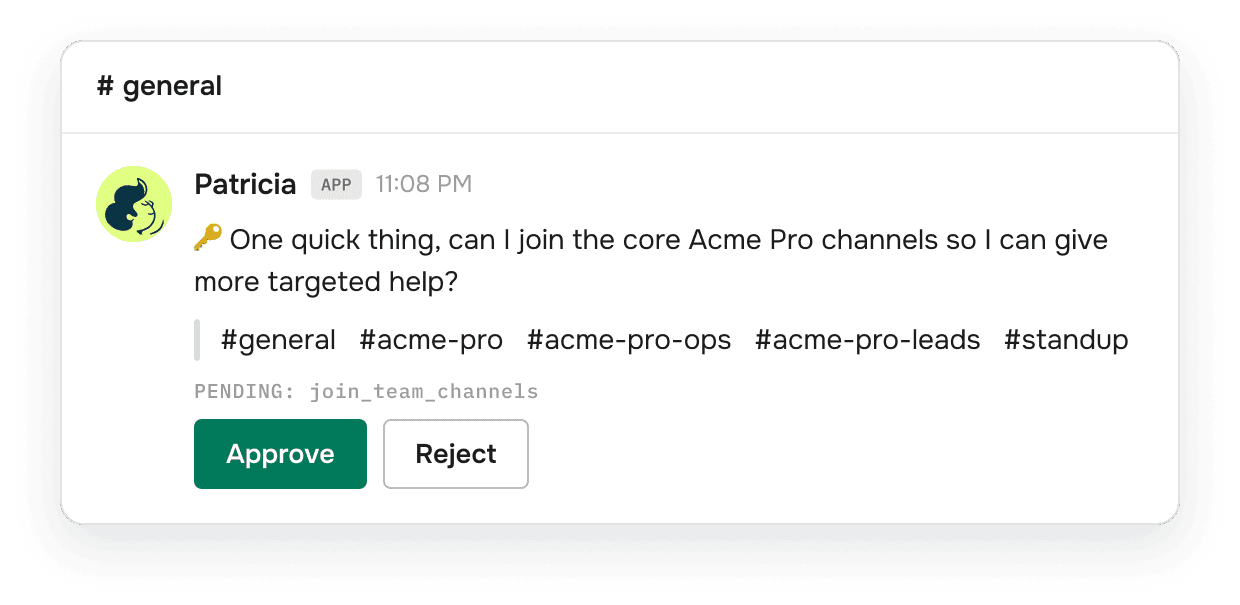
- She runs the recurring client work without a build: weekly and monthly client reports, ad spend and anomaly alerts on Google Ads, Meta Ads and LinkedIn Ads, call recaps, content briefs and follow-ups. For BetterPic, our sister company and first client, a client report used 613 credits in October 2026 (about $1.38) and one anomaly watch run 467 (about $1.05). She asks before she spends ad budget or sends anything to a client, by default. SOC 2 Type II audited.
- Limits
- Data is hosted in the US only. Far fewer integrations than Zapier's 9,000+ apps. Some Slack features are not in Teams yet. Start is a dedicated onboarding with our team; self-serve onboarding launches soon.
- Pick it if
- You want the client report and the spend alerts running in your client channels without building them. Patricia vs Zapier Agents.
2. Viktor
- Who it is for
- Teams that want one shared AI employee. It "lives in Slack, Microsoft Teams and email" and works across 9,800+ tools.
- Price
- Free with up to $100 in credits, no credit card. Team is $100 a month for 40,000 credits shared across the workspace, with a $50 tier for 20,000. Unused plan credits roll over for one month.
- Strengths
- Its agencies page promises "Weekly client reports, ready before Friday" and audits of budget pacing, search waste, tracking gaps and creative fatigue. It waits for approval before sensitive actions "when the tool is set to ask first."
- Limits
- Its FAQ says it "is SOC 2 Type 1 compliant, with SOC 2 Type 2 and ISO 27001 currently in progress." It is built for every department, so agency work is one use case among many.
- Pick it if
- You want a self-serve start today and the widest tool catalogue on this list. Patricia vs Viktor.
3. Lindy
- Who it is for
- Teams that want an AI employee in Slack that also works over iMessage, email and the browser.
- Price
- $50 in free credits that last 7 days. Team is from $29.99 per active user a month for 3,000 credits: its pricing page says "Every active user in your workspace is billed, from $29.99 a month for 3,000 credits each" (checked 20 November 2026). Monthly credits do not roll over; top-ups at $10 per 1,000 stay.
- Strengths
- 3,000+ integrations plus MCP. SOC 2 Type II. Roles for client reporting and paid ads: "Every Friday I pull each client's numbers and draft their report in your format, ready for your OK."
- Limits
- Billed per active user. Microsoft Teams is not among the places its home page says it works.
- Pick it if
- You want one assistant that also handles your inbox, calendar and texts. Patricia vs Lindy.
4. Gumloop
- Who it is for
- Companies where teams build, share and control their own agents. It calls itself "The enterprise AI agent platform."
- Price
- Pro at $37 a month after a 14-day free trial, with 20,000 credits and unlimited seats. It adds an 8% orchestration fee on the full list cost of each task, or 16% if you bring your own model keys. Unused credits do not roll over.
- Strengths
- Agents meet the team in Slack, Microsoft Teams, email and text. SOC 2 Type II and GDPR, per its home page.
- Limits
- You build each agent. The fee is on top of the credits.
- Pick it if
- You have an operator who wants to build agents and share them with the team.
5. Relevance AI
- Who it is for
- Revenue teams that build specialist agents. Its site speaks to sales, customer success and marketing operations.
- Price
- The public pricing page shows Enterprise only, through sales. Its docs list Pro at $19 a month billed yearly ($29 monthly) and Team at $234 billed yearly ($349 monthly), and say the Free plan is retired.
- Strengths
- 2,000+ integrations and SOC 2 Type II. Its home page says "Reps hand off work, add context and approve drafts from Slack or Teams."
- Limits
- You build the agents before the first job runs. Pro bills actions and vendor credits separately.
- Pick it if
- You run outbound or research for clients and have someone to own the agents.
6. Make
- Who it is for
- Teams that design automations as flowcharts and want AI agents on the same canvas.
- Price
- Free plan with 1,000 credits a month. Make's own comparison page says "paid plans starting at $9 for 10,000 credits per month."
- Strengths
- 3,000+ native apps. AI agents are "Available on all plans," and you can "add manual approvals, or stop the Agent at specific points."
- Limits
- You design every scenario, and AI steps can use more than one credit.
- Pick it if
- You like flowcharts and want the lowest paid entry price on this list.
7. n8n
- Who it is for
- Technical teams that want to "Self-host to keep data in-house."
- Price
- Cloud Starter 20 euros a month billed yearly for 2,500 workflow executions, with unlimited users. A self-hosted Community Edition is on GitHub.
- Strengths
- 600+ native integrations. You "Set the tools an agent can reach and actions that need a human," and human approval for tool calls is on every plan.
- Limits
- You run the server, or you pay for cloud, and you build everything.
- Pick it if
- You have a developer and client data must stay on your own servers.

How does each tool charge as the agency grows?
Each tool meters a different unit, so the bill grows with different things. Lindy grows with headcount, n8n with workflow runs, Zapier Agents with activities, Make and Gumloop with credits, and Patricia and Viktor with the work done across one workspace. Relevance AI meters tool runs and model use separately. Pricing models on 18 November 2026:
| Tool | Pricing model | What makes the bill grow |
|---|---|---|
| Patricia | Per workspace, credits included | Work done, under a monthly cap you set |
| Viktor | Per workspace, shared credits | Work done |
| Lindy | Per active user, pooled credits | Headcount and work done |
| Gumloop | Plan with unlimited seats, credits plus 8% fee | Model, compute and tool costs |
| Relevance AI | Plan with actions and vendor credits | Tool runs and model use |
| Make | Credits | Scenario steps |
| n8n | Workflow executions, unlimited users | Workflow runs |
| Zapier Agents | Activities | Agent actions, searches and lookups |
The builder tools look cheap because the hours go into building, so count that time too. A credit at one vendor is a different unit from a credit at another, so compare what a month of your real jobs costs, not the credit counts.
When is Patricia the wrong pick?
Patricia is the wrong pick when you want to build your own automations, need client data on your own servers or in the EU, want an agent that moves ad budget on its own, or want to start alone tonight. Each of those has a better tool on this list.
- Your team already owns Zapier and likes building. Zapier Agents reuses the apps you have connected across 9,000+.
- Client data must stay on your servers or in the EU. n8n self-hosts. Patricia's data is hosted in the US.
- You want an agent that moves ad budget on its own. Lindy's paid ads role moves budget "within your caps," and its home page says that once you trust it with a job it can run it end to end. Patricia asks before she spends ad budget, by default.
- You want the lowest entry price and will build. Make starts at $9 a month and Zapier Agents has a free tier.
- You want to start alone tonight. Viktor, Lindy, Gumloop, Make, n8n and Zapier all have a self-serve start. Patricia starts with a dedicated onboarding; self-serve launches soon.
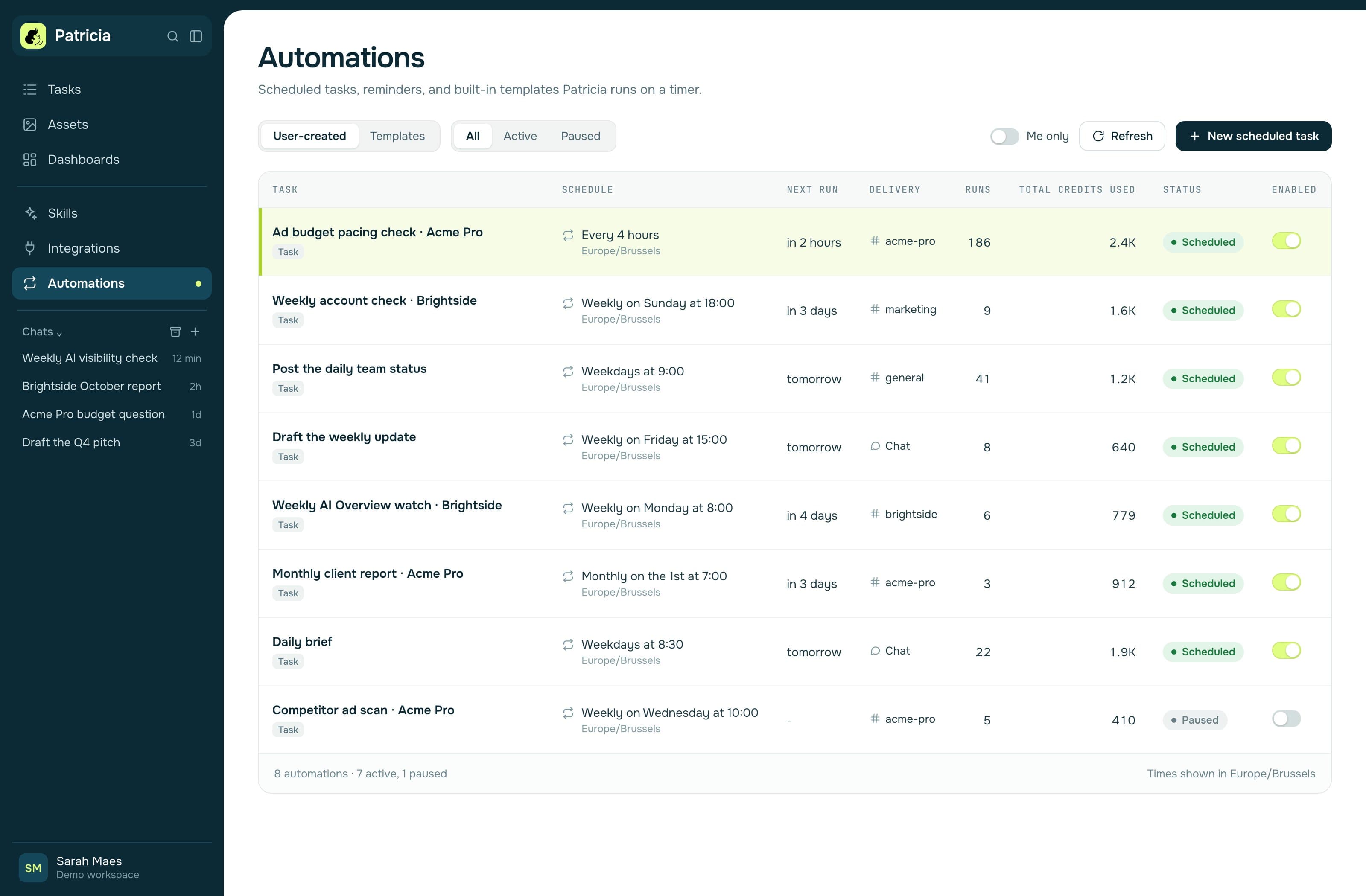
If none of that is you, the client reporting and Google Ads pages show the jobs she runs. We also compare Patricia one to one with Zapier Agents, list the Tasklet alternatives and the Lindy alternatives, and compare the rest of the field on the comparisons page.
Vendor facts checked on each vendor's own site on 18 November 2026. Prices change; check before you buy.
FAQ
What is the best Zapier Agents alternative for a marketing agency?
For an AI coworker that already runs agency jobs in Slack or Microsoft Teams, Patricia (we make it). For one AI employee across every department, Viktor or Lindy. To keep building your own agents, Make, n8n, Gumloop or Relevance AI. Facts checked on each vendor's site on 18 November 2026.
Is there a free Zapier Agents alternative?
n8n has a self-hosted Community Edition. Make has a free plan with 1,000 credits a month. Viktor starts free with up to $100 in credits, Lindy with $50 in credits for 7 days, and Gumloop with a 14-day trial. Patricia gives $100 of free credits, plus a dedicated onboarding session with our team. Checked 18 November 2026.
Which Zapier Agents alternatives work in Microsoft Teams?
Patricia, Viktor and Gumloop name Microsoft Teams as a place their agents work. Relevance AI says reps approve drafts from Slack or Teams. Lindy names Slack, iMessage, email and the browser. Zapier's Agents page names Slack templates and a Chrome extension, not Teams.
Do Zapier Agents ask before they act?
Only if you set it up. Zapier's help center says to write "ask for my confirmation" into the agent's instructions, or to add a Human in the Loop step after the agent in a Zap, with approval requests by email or Slack. Patricia asks before she spends ad budget or sends anything to a client, by default.
Can a Zapier Agents alternative run client reports without a build?
Patricia runs the weekly and monthly client report as a ready job after onboarding. Viktor's agencies page and Lindy's home page also describe weekly client reports drafted for your review. With Make, n8n, Gumloop or Relevance AI you build the report flow yourself.

Growth Manager at Patricia